Crawl Budget Optimization: When It Matters and How to Fix It
7,950 clicks/month is not the problem. **16,100 indexed pages versus 591,000 not indexed pages is.** On enzymes.bio, crawl efficiency only mattered once Google had a huge URL surface, 0 external backlinks, and clear signals in `Settings › Crawl stats`.
When crawl budget matters
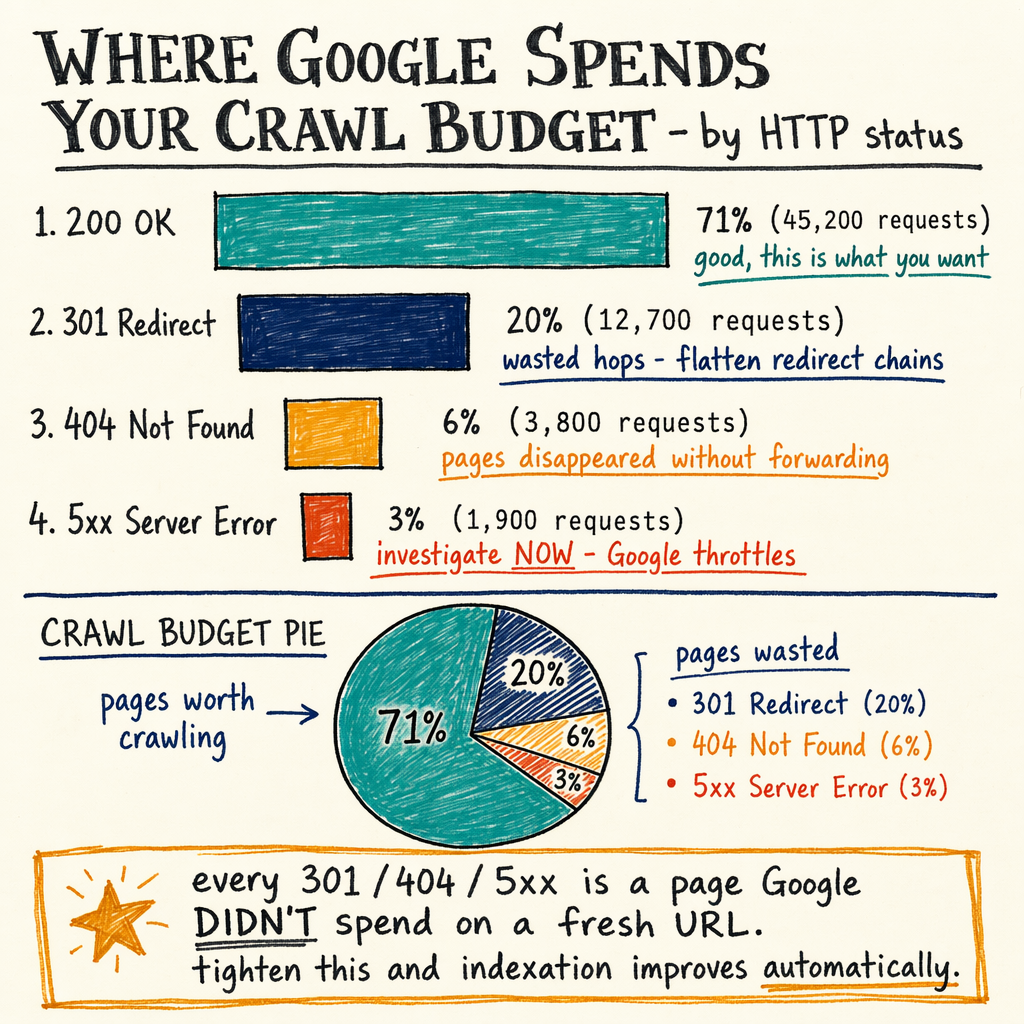
On enzymes.bio, Google is already sending 7,950 organic clicks/month and showing 557,000 impressions/month with a 1.4% sitewide CTR and average position 12.4. That is not a crawl-starvation profile by default. The signal that makes crawl budget optimization relevant is the URL inventory: 16,100 indexed pages and 591,000 not indexed pages, with 0 external backlinks to help prioritize discovery.
Crawl budget becomes worth fixing when Googlebot is spending time on the wrong URLs, recrawling junk, or missing important pages because the site is too large, too thin, or too noisy. On a small site, Google will usually find everything anyway. On a large site SEO problem, it starts to matter when the crawl budget is being wasted on parameter URLs, duplicate language variants, faceted navigation, calendar pages, or endless soft-404 patterns.
The practical test is simple: if Performance › Search results is flat while Indexing › Pages shows a huge not-indexed footprint, and Settings › Crawl stats shows plenty of requests but poor coverage, you have a crawl efficiency issue. If the site has only a few hundred URLs, this is usually not the bottleneck.
Read the GSC signals
Indexing › Pages
This is the first place to check. Look for spikes in Discovered - currently not indexed, Crawled - currently not indexed, Duplicate, Google chose different canonical, and Alternate page with proper canonical tag. On enzymes.bio, the gap between 16,100 indexed and 591,000 not indexed tells you the URL surface is far bigger than the index footprint.
Settings › Crawl stats
Use this to see request volume, average response time, and file types fetched. A crawl budget issue often shows up as a lot of HTML requests with weak index growth, or a slow response curve that makes Googlebot back off.
Performance › Search results
Pair crawl data with query and page performance. If an important template gets impressions but no meaningful indexed growth, Google may be crawling it but not trusting it enough to index at scale.
Links › External links
With 0 external backlinks, discovery and priority signals are weak. That does not create crawl budget by itself, but it removes one of the fastest ways for Google to find and revisit important pages.
Eight levers that move it
- 01
Reduce URL inflation
Kill parameter combinations, internal search pages, sort orders, session IDs, calendar traps, and duplicate translation paths. Fewer low-value URLs means Googlebot spends more time on pages that can rank.
- 02
Fix internal linking depth
Pages that sit 4-6 clicks deep are easy to miss on very large sites. Push key pages into hubs, category pages, and breadcrumbs so discovery happens through HTML links, not just XML.
- 03
Clean robots.txt
Use
Disallowcarefully. Block wasteful crawl paths, but do not block URLs that must be discovered for canonical consolidation. See robots.txt best practices. - 04
Tighten XML sitemaps
Only include canonical, indexable URLs with
200responses. Split sitemaps by type or language when it helps monitoring. See XML sitemap best practices. - 05
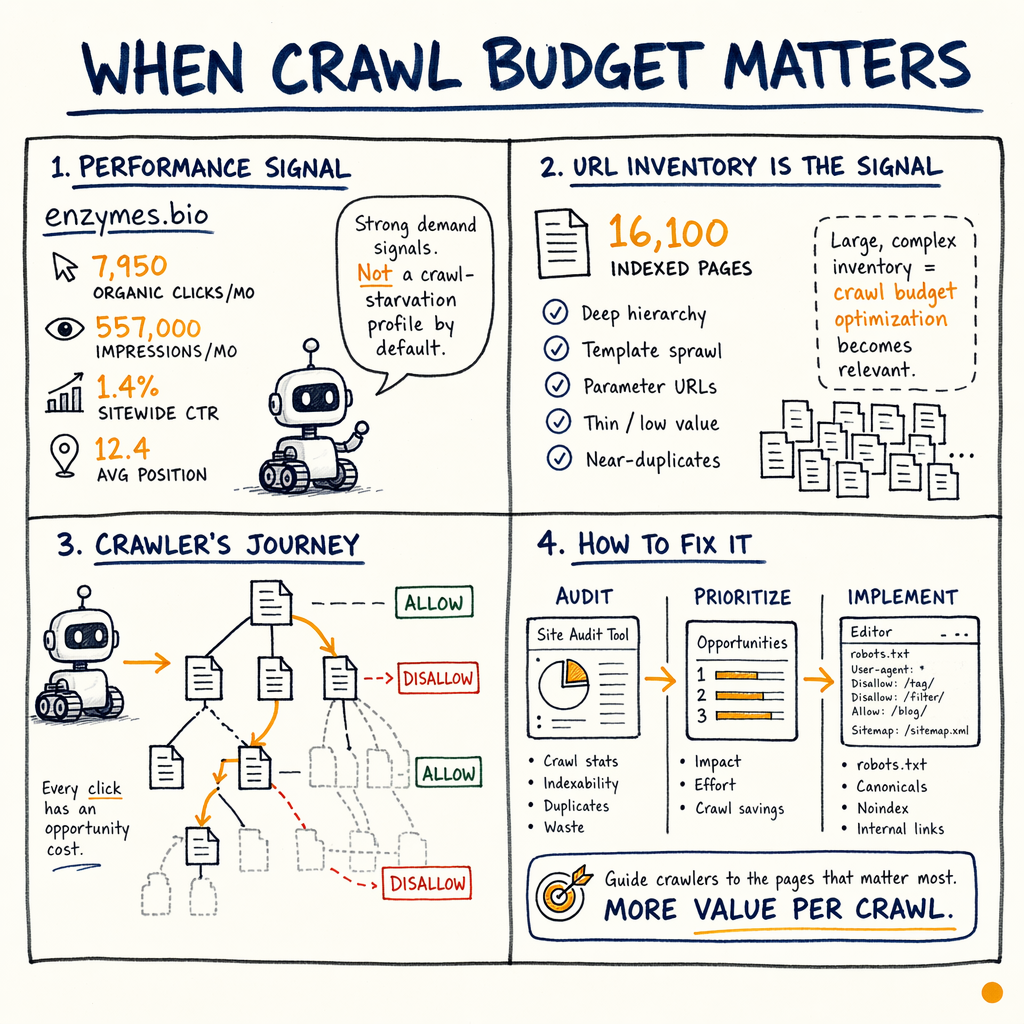
Fix response codes
Avoid chains of
301redirects, unnecessary302hops, soft404s, and repeat5xxerrors. Googlebot will keep probing broken areas, but it wastes crawl budget while doing it. - 06
Improve server speed
If HTML consistently loads slowly, crawl rate drops. Faster TTFB and stable
200responses make recrawl cheaper, especially on pages that change often. - 07
Remove duplicate signals
Canonical tags, hreflang, pagination, and internal links need to agree. Conflicting signals push Google into repeated testing instead of clean indexing.
- 08
Use logs to verify
Server logs tell you what Googlebot actually fetched, not what you hoped it fetched. That is the fastest way to see whether the crawl budget problem is real or just a GSC artifact.
Robots, sitemaps, and status codes
| Field | Good pattern | Bad pattern |
|---|---|---|
robots.txt | Block junk paths, allow canonical pages, keep it readable | Block important folders or blanket-disallow templates Google needs |
XML sitemaps | Canonical | Every URL ever seen, including redirects, |
Redirects | Single-hop | Long chains of |
Not found handling |
| Soft |
Error handling | Rare | Repeated |
Robots and sitemap examples
robots.txt
User-agent: *
Disallow: /search
Disallow: /cart
Disallow: /checkout
Disallow: /*?sort=
Disallow: /*?filter=

Sitemap: https://example.com/sitemap.xml

XML sitemap entry
<url>
  <loc>https://example.com/product/widget-a/</loc>
  <lastmod>2026-05-20</lastmod>
</url>

What not to do: include redirected URLs, `404`s, or internal search URLs in the sitemap.
Server logs and Googlebot
The fastest way to diagnose crawl budget is a log sample, because it shows the actual Googlebot request mix. Filter by user agent, then group by status code and path pattern. You want to know how much crawl goes to 200, 301, 302, 304, 404, 410, 429, and 5xx responses.
A healthy large site often has a high share of 200 and 304, low 301 chains, and very limited error traffic. A bad one shows crawler loops: /product/ variants, faceted URLs, lowercase/uppercase duplicates, and endless redirects from legacy structures. If the log tells you Googlebot is hammering junk URLs while your important templates barely get touched, the crawl budget issue is confirmed.
This is where Settings › Crawl stats and logs should agree. If they do not, trust the logs for the fetch reality and GSC for the Google-visible summary. Both matter, but logs are the source of truth for crawl paths.
Log analysis commands
grep -i "googlebot" access.log | awk '{print $9, $7}' | sort | uniq -c | sort -nr

# Count status codes for Googlebot hits
grep -i "googlebot" access.log | awk '{print $9}' | sort | uniq -c | sort -nr

# Find repeated crawl on parameter URLs
grep -i "googlebot" access.log | grep -E '\?|sort=|filter=' | head -50

# Find redirect chains
grep -i "googlebot" access.log | awk '$9 ~ /^30[12]$/'
Cloudflare worker patterns
Cloudflare can help crawl efficiency if it is used as a traffic shaper, not a content trap. Good patterns include redirect normalization, cache-friendly HTML on stable templates, and blocking abusive parameter space before it reaches origin. Bad patterns include bot-specific cloaking, inconsistent headers, or dynamic 429 bursts that make Googlebot back off.
A useful worker pattern is simple normalization: collapse duplicate trailing slashes, uppercase variants, and known junk parameters into a single canonical URL. That reduces duplicate crawl paths without changing page content. If you must rate-limit, do it narrowly and never on canonical HTML pages that Google needs to refresh.
If your site already runs behind Cloudflare, check whether HTML responses are being cached predictably and whether 304 revalidation is working. Crawl budget optimization often improves when Googlebot can get stable 200 responses or cheap 304s instead of repeated origin hits.
Worker normalization sketch
export default {
  async fetch(request) {
    const url = new URL(request.url);

    // Normalize duplicate slashes and junk tracking params
    url.pathname = url.pathname.replace(/\/+/g, '/');
    ['utm_source', 'utm_medium', 'utm_campaign', 'sort', 'filter'].forEach((p) => {
      url.searchParams.delete(p);
    });

    if (request.url !== url.toString()) {
      return Response.redirect(url.toString(), 301);
    }

    return fetch(request);
  }
};
Audit workflow for large sites
- ✓
Start in
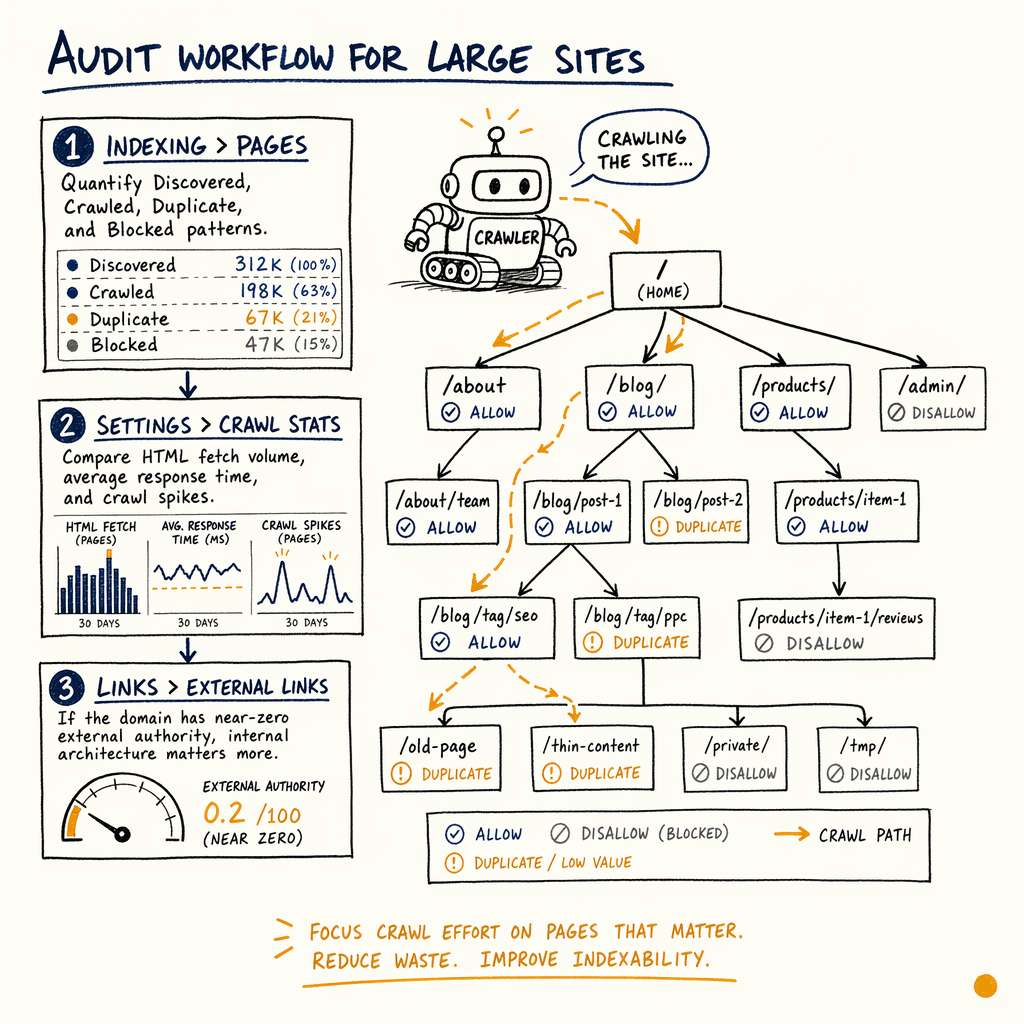
Indexing › Pages: quantifyDiscovered,Crawled,Duplicate, andBlockedpatterns. - ✓
Open
Settings › Crawl stats: compare HTML fetch volume, average response time, and crawl spikes. - ✓
Check
Links › External links: if the domain has near-zero external authority, internal architecture matters more. - ✓
Review XML sitemaps: remove redirected, noindex, and parameterized URLs.
- ✓
Inspect robots.txt: block search, filters, cart, and test areas, but keep canonical content crawlable.
- ✓
Pull server logs for 7-30 days and segment Googlebot by path, status, and template.
- ✓
Map redirect chains and fix anything longer than one hop.
- ✓
Use Google Search Console guide to connect crawl data to index and performance changes.
- ✓
If important URLs are missing from the index, see indexing issues troubleshooting.
- ✓
For a full crawl budget audit, book a technical SEO audit.
FAQ
How do you know crawl budget is the real problem?
You see large crawl volume in Settings › Crawl stats, but index growth stalls, important pages stay out of Indexing › Pages, and logs show Googlebot wasting requests on duplicates, redirects, or parameter URLs.
Does every site need crawl budget optimization?
No. Small sites usually do not need it. It matters when URL counts are large, content changes frequently, or crawl waste is high enough that important pages are not being revisited on time.
Which status codes hurt crawl efficiency most?
Repeated 301 chains, unnecessary 302s, soft 404s, recurring 429s, and unstable 5xx errors are the usual offenders. They consume crawl without advancing index coverage.
Should you block URLs in robots.txt or noindex them?
Use robots.txt to stop wasteful crawling, and noindex when a page should be crawled but not indexed. If Google needs to see the page to understand canonical relationships, blocking it can backfire.
How do sitemaps fit into crawl budget?
Sitemaps do not create crawl budget, but they steer discovery. A clean sitemap helps Google prioritise canonical 200 URLs and ignore junk variants.
Can Cloudflare hurt crawl rate?
Yes, if it introduces caching bugs, bot blocks, or 429 bursts. It can also help if it normalizes URLs, shields origin, and keeps HTML fast for Googlebot.